OwlyCrackGeo

See which AI bots crawl your WordPress and which AI engines like ChatGPT, Claude, and Perplexity send real referral clicks

Separate training scrapers from real readers clicking through from ChatGPT and Perplexity. 100% free, open-source, and self-hosted in your WordPress.

Test any URL for AI search readiness (10s free check)

robots.txt · H1 · Schema · llms.txt
https://
Try a live example:
Public URLs only · Privacy details
wp-admin/admin.php?page=owlycrackgeoOpen full-size image ↗
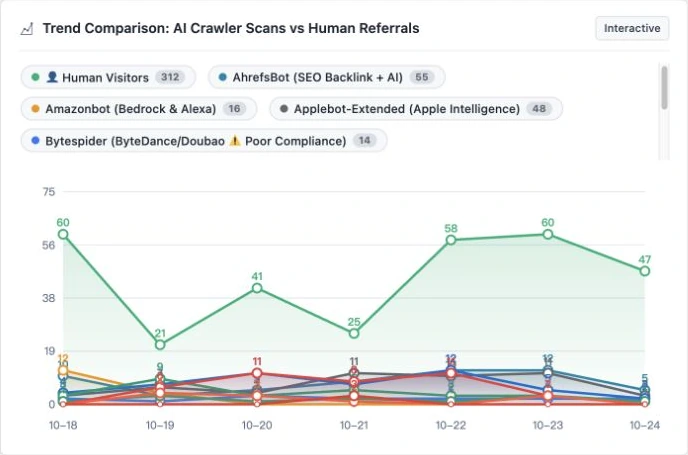
OwlyCrackGeo dashboard comparing AI crawler requests and human visit trends
AI crawlers classified
12+
Frontend JS injected
0 KB
Self-hosted in your WP
100%

Runs natively in WordPress PHP with zero frontend scripts. How to read your AI traffic metrics

Everything you need to see AI traffic

Separate model-training scrapers from AI search bots

Automatically classify 60+ AI bots and separate training scrapers from search crawlers.

OAI-SearchBotSearch
/blog/ai-crawlers-guide/200
PerplexityBotSearch
/docs/understanding-data/200
GPTBotTraining
/2026/product-review/0 clicks

Know which AI bots to allow vs. block

Click any crawler below to see who runs it and whether to allow it.

OpenAI search crawler: surfaces live web links in ChatGPT answers. Recommended: Allow.

Your traffic logs stay on your server.No cloud middleman required.

Most AI analytics tools force you to ship your server logs to a paid SaaS dashboard. OwlyCrackGeo stores everything right inside your own WordPress database.

Zero automatic cloud uploads

Crawler logs and referral stats stay in your local WordPress database tables.

Plain-English crawler switches

Allow or block specific AI bots via robots.txt and firewall rules right from WP Admin.

Clear, documented external calls

External connections happen only when you use reverse-DNS checks, IndexNow, or external links.

Why we built OwlyCrackGeo

While running our own WordPress sites, we noticed a huge blind spot: GPTBot, ClaudeBot, and PerplexityBot were hitting our pages thousands of times a week, yet Google Analytics showed nothing—because AI bots never run browser JavaScript.

We couldn't tell which articles were actually sending real referral clicks from ChatGPT versus getting scraped for model training. Existing GEO SaaS tools cost hundreds of dollars a month and required shipping logs to third-party servers.

So we built OwlyCrackGeo: a clean, native WordPress plugin with 0 KB of frontend JS and 100% local database storage.
  1. 01

    Install from WordPress.org

    Go to Plugins → Add New in WordPress, search for OwlyCrackGeo, and click Activate.

  2. 02

    Let real traffic arrive

    Open the OwlyCrackGeo dashboard. Charts populate automatically as bots and readers visit.

  3. 03

    Adjust rules & improve posts

    Block unwanted training scrapers, keep AI search bots open, and tune your top articles.

FAQ

Common questions, straight answers

Pricing, citations, server load, and SEO plugin compatibility.

See all FAQs
Is OwlyCrackGeo really free?

Yes. The WordPress plugin is 100% free and open source (GPLv2+). Download it from WordPress.org and use every feature without a credit card or SaaS account.

Will installing this guarantee ChatGPT cites my website?

No tool can guarantee AI citations. However, many sites accidentally block AI search bots in robots.txt or publish pages without clear summaries or Schema markup. OwlyCrackGeo helps you remove those roadblocks and track real referrals.

Where is my analytics data stored?

Right inside your own WordPress database. Nothing is uploaded to an OwlyCrackGeo cloud server.

Can I use it alongside Yoast SEO or Rank Math?

Yes. Traditional SEO plugins focus on Google rankings and sitemaps, while OwlyCrackGeo focuses on AI crawler logs and AI referral traffic. If both plugins manage robots.txt or Schema, simply keep one enabled for those settings.

See which AI bots are on your WordPress site today.

Install OwlyCrackGeo from WordPress.org in under three minutes—no account required.

Requires WordPress 5.6+ and PHP 7.4+.